


FaxReceive - receive fax phone
4.4155.00 Reviews
App Specs
- Version
- Varies with Device
- Updated On
- License
- Free
- Downloads
- 50,000+
- Developer
- Actual Software Inc.
- Categories
- Business
- Platform
- Android
Screenshots


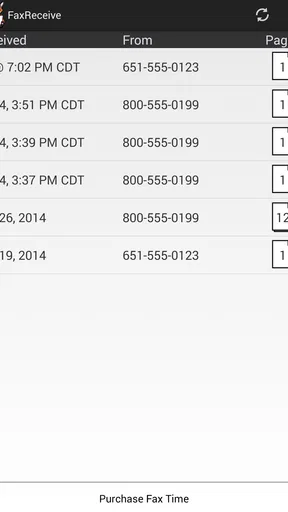
 Analysis by AppCompare
There is a particular kind of business interruption that feels absurdly old-fashioned: someone asks for a fax, and suddenly a simple document exchange turns into a search for a physical machine, a working phone line, paper, and a place to stand while the pages go through. FaxReceive - receive fax phone is built for the narrower half of that problem. It gives you a way to receive faxes on an Android phone or tablet instead of waiting beside an office fax machine.
I see the app as a practical emergency tool rather than a complete replacement for every fax workflow. If your work occasionally involves incoming faxes from a clinic, insurer, government office, supplier, or customer, moving that arrival point to a mobile device can save a surprising amount of time. You do not need to keep checking whether a paper document came through, and you can review the received material where you already handle other work.
That focus matters. This is a business app from Actual Software Inc., listed as free and suitable for Everyone. It has reached more than fifty thousand installs and holds an average rating of 4.4 from roughly five hundred ratings, which suggests that its straightforward purpose has found an audience. The app is called FaxReceive, and its short store label is simply “FaxReceive,” so there is little ambiguity about what it is intended to do.
Turning an occasional fax into a manageable phone task
I look at the trust question through practical choices rather than assumptions: a fax can contain information that deserves careful handling, so the receiving device and the people who can access it matter as much as convenience. The next section focuses on how I would establish a controlled routine before relying on a phone or tablet for incoming documents.
The setup is useful because it starts with the actual problem
When I approach a utility like this, I do not want a long productivity system to learn. I want to know whether I can make the phone ready to receive a document before the next person asks for it. The first useful step is to install the app, open it, and follow the receiving process it presents. The important mindset is to prepare before the urgent fax is expected, not while someone is waiting on the other end.
That preparation changes the app from a last-minute experiment into a dependable contact point. If you use fax only a few times a month, write down the receiving details somewhere accessible and make sure the device is available when a document is expected. A spare tablet can be more practical than a personal phone in a small office because it can remain in a known location, while a phone is better for a mobile worker who cannot stay near a desk.
I would also make a habit of checking the app before an important incoming document is due. This is not glamorous advice, but it is where the time savings come from. A receiving app is only helpful if it is ready when the fax is sent. Treating setup as a one-time installation and forgetting about it until an urgent moment is the easiest way to create avoidable friction.
Worth Reading Before You Choose

Flipboard Shows What News Apps Must Do Beyond the Feed

Switching to Android Auto Means Rethinking Your Driving Routine

Google Calendar Makes a Crowded Week Easier to Manage

Ludo King Makes the Most of the Minutes Between Plans

Baby Panda World Brings Quick Play to Modern Phones, but Its Game Library Feels Busy

ESPN’s Live Game View Makes Following Close Games Easier
The free entry point makes trying that workflow less intimidating. However, the app includes in-app purchases ranging from $4.99 to $139.99 per item, so I would not assume that every useful part of a longer-term fax routine is covered without cost. Before relying on it for regular business work, I would check what the current receiving arrangement allows and whether the expected volume fits the purchase options shown inside the app.
A realistic first-use scenario
Imagine a self-employed contractor who is away from the workshop when an insurance company sends a document that needs attention. Without a mobile receiving option, the contractor may have to ask someone at the workshop to watch a fax machine, photograph the pages, and send them through another channel. With FaxReceive prepared on a phone or tablet, the incoming document can arrive at the device associated with the workday, reducing the number of handoffs.
The benefit is not just speed. Every handoff creates a chance of a missing page, an unreadable image, or a document being left where the wrong person can see it. Receiving directly on a work device gives the process a clearer owner. I still would not leave sensitive paperwork unattended on a shared device, but the workflow is easier to control than a paper tray in a busy office.
Where it fits in a small business
For a small business, the app makes the most sense when incoming faxes are irregular but still important. A repair shop, independent medical office, property manager, legal assistant, or home-based business may not need a full communications platform. Paying for and maintaining a traditional fax machine can feel excessive when only a few documents arrive, yet missing one of those documents can delay a job or decision.
FaxReceive can serve as a dedicated receiving point without forcing the whole business to change its other tools. You can continue using email, cloud storage, messaging, and document editors for the tasks they handle well. The app’s value is concentrated in the moment when a sender insists on faxing rather than using one of those modern alternatives.
That narrow role is also a reason to avoid overselling it. If your team sends and receives faxes constantly, needs shared access, or must manage a formal archive, a purpose-built online fax service may be a better fit. A phone-based receiver is convenient, but convenience is not the same as a complete records-management system.
What it removes from the daily routine
The clearest improvement is the removal of the physical waiting point. You do not have to be in the same room as a fax machine to know that a document has arrived. That is especially useful for people who move between a front desk, a vehicle, a job site, and a home office during the day.
It also reduces the need to turn paper into a digital document after arrival. With a conventional machine, someone may need to collect the pages, scan them, rename them, and pass them to the person responsible. A mobile receiving workflow puts the document closer to the digital side of the business from the start. Even if you still need to organize or forward it manually, one physical conversion step disappears.
Another small but meaningful advantage is continuity. If the office is closed but the designated device remains available, an incoming fax does not necessarily have to wait for the next person to arrive. That can help with time-sensitive paperwork, although I would only depend on this after testing the complete process with a noncritical document.
Three practical habits that make the app more useful
First, use a dedicated receiving device when the app is part of a shared office process. A tablet kept in a secure workspace can make ownership clearer than a personal phone that is constantly changing hands. This is not a special feature claim; it is a workflow choice that makes any mobile receiver easier to manage.
Second, create a simple naming and filing routine immediately after a document arrives. For example, record the sender, the date, and the job or customer it concerns before moving on to the next task. The app’s core job is receiving, so the surrounding organization determines whether the time saved at the front end survives later.
Third, test the entire chain before a deadline: ask a trusted sender to transmit a harmless document, confirm that it arrives, check that the pages are readable, and verify that you can locate it again. This catches practical problems that a store description cannot answer, such as whether the receiving device is positioned well for your working pattern or whether your team understands who checks it.
Where the usual alternatives still win
A physical fax machine remains useful when an office already has one, receives paper continuously, and needs a visible shared queue. It is easy for several people to see that pages have arrived, although that visibility can also expose private documents. A mobile receiver is better for portability and digital handling, while a machine can feel simpler for a team that is already organized around paper.
Email is usually the better choice when the sender is willing to use it. It is more familiar for most teams and generally easier to search, forward, and discuss. The reason to use this app is not that fax is superior; it is that some organizations still require fax and may not accept an email attachment as an equivalent channel.
Online fax platforms tend to be stronger for teams that need multiple users, sending as well as receiving, centralized history, or structured administration. They may also be easier to scale when fax becomes a regular part of operations. FaxReceive is more appealing when the main requirement is simply to receive on a phone or tablet and avoid maintaining a full office setup.
Important limits before making it your only fax system
The first limitation is scope. The app’s stated purpose centers on receiving, so I would not install it expecting a complete send-and-receive replacement for a business fax service. If your work depends on sending signed forms, tracking delivery, or coordinating several fax numbers, confirm that your broader process is covered elsewhere before retiring existing equipment.
The second limitation is reliability planning. A mobile device can be misplaced, unavailable, or used for another purpose at the exact moment a fax arrives. A dedicated tablet and a clear checking routine reduce that risk, but they do not remove the need for responsibility. For critical documents, I would keep a backup contact or alternate receiving method until the app has proved itself in the specific environment where it will be used.
There is also a privacy consideration. Incoming business documents can contain personal, financial, or medical information. A shared phone is a poor receiving point for that kind of material unless access is controlled and the document is moved promptly to the right place. The app can reduce paper exposure, but it does not automatically solve every security issue surrounding the device, the people who use it, or the way files are handled afterward.
Cost deserves a realistic look too. Free installation is helpful for testing, but the available in-app purchase range reaches from a few dollars to well over a hundred dollars per item. That makes the app easy to try but not automatically inexpensive for a high-volume operation. I would compare the expected number of incoming documents with the purchase choices before treating it as a permanent replacement for an established fax service.
Who should use it, and who should skip it
I would recommend trying FaxReceive if you are an individual professional, a small office, or a mobile worker who receives faxes occasionally and wants them to reach a phone or tablet. It is particularly suitable when the main annoyance is being tied to a physical machine or asking another person to collect pages for you.
I would be more cautious if several employees need simultaneous access, if every document must enter a regulated archive, or if your business depends on outbound faxing as much as inbound faxing. In those cases, a dedicated online fax product with team controls and a clearer administrative structure is likely to save more time in the long run, even if its setup is less lightweight.
I would also skip it as a first choice if your contacts can reliably use email or secure document portals. Adding fax to a workflow that does not require it creates another place to monitor. The app is valuable because it removes an unavoidable obstacle, not because fax itself should replace simpler communication.
My final view after judging the friction it removes
FaxReceive succeeds by staying close to one recurring business headache: receiving a fax when no fax machine is convenient. Its strongest quality is not a long feature list but the possibility of moving that task onto a device you already carry or can leave in a small office. For the right user, that can eliminate waiting, paper collection, scanning, and unnecessary handoffs.
I would approach it as a focused receiver, test it before trusting it with urgent paperwork, and build a sensible filing and privacy routine around it. The free starting point makes experimentation reasonable, while the in-app purchase range means regular users should examine the ongoing cost rather than assuming the whole workflow is free.
Actual Software Inc. has made a tool for a specific gap rather than a broad business suite. That is both its strength and its boundary. If incoming fax is an occasional but stubborn requirement, I think it is worth trying. If you need a full fax department in an app, shared administration, or a replacement for every paper and sending task, I would choose a more comprehensive service instead. My recommendation is positive for occasional mobile fax reception, provided you test the complete workflow before making it your only option.
Pros
- Turns your phone into a convenient fax-receiving tool.
- Useful for receiving documents while away from the office.
- Reduces the need for a physical fax machine.
- Keeps received faxes accessible on a mobile device.
- Can simplify fax handling for small businesses and freelancers.
Cons
- Requires a reliable internet connection to receive faxes.
- A dedicated fax number or subscription may be required.
- Incoming fax quality depends on the sender and connection.
- Not ideal for users who only receive faxes occasionally.
- Sensitive documents may raise privacy and security concerns.
FAQs for FaxReceive - receive fax phone
What is FaxReceive - receive fax phone, and how does it work?
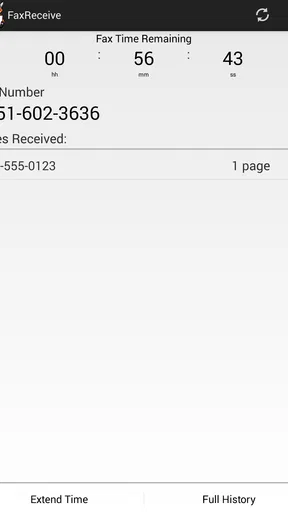
FaxReceive - receive fax phone is a mobile application designed to let users receive faxes through a smartphone instead of using a traditional fax machine. After installing the app, you generally obtain or connect a fax number, then share that number with the sender. Incoming documents are delivered digitally inside the app, where you can view, download, save, or share them, depending on the available features and permissions.
Can I receive a fax without owning a physical fax machine?
Yes. The main purpose of FaxReceive - receive fax phone is to provide a digital alternative to conventional fax equipment. You do not normally need a phone-line fax machine, printer, or scanner to receive documents. However, availability may depend on the country, the type of fax number offered, and the subscription or credit plan selected. Check the app’s current terms before relying on it for important business communications.
Is FaxReceive - receive fax phone free to use?
The application may be available to download at no initial cost, but receiving faxes can involve limitations, paid plans, credits, or in-app purchases. Some services offer a trial period or a restricted number of pages, while others charge according to usage or subscription duration. Before downloading or activating a number, review the pricing details shown in the app store and inside the application.
What happens when a fax arrives, and where are received documents stored?
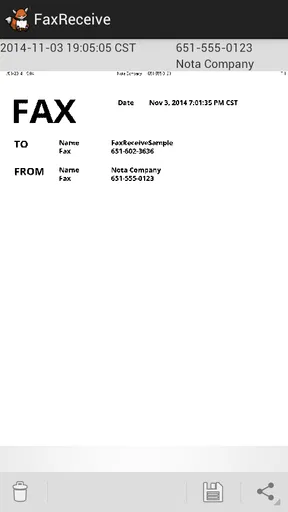
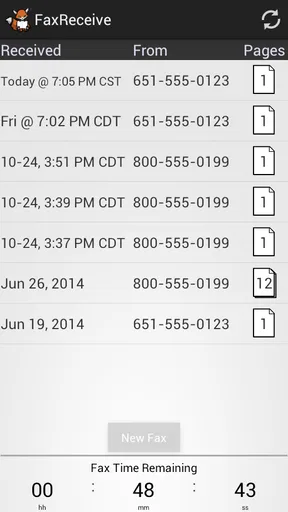
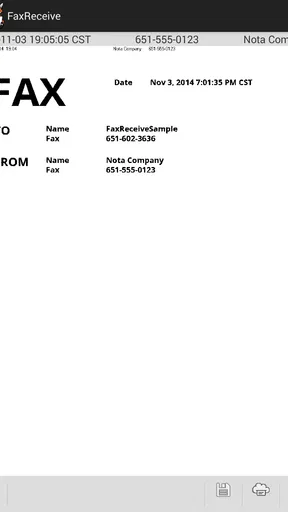
When a fax is successfully delivered, the app typically places it in an inbox and may notify you through a push notification. From there, you can open the document, review its pages, and possibly download or share it as a PDF or another supported file type. Storage behavior can vary, so important documents should be exported to a secure location rather than left only in the app.
Is FaxReceive - receive fax phone secure enough for private or business documents?
FaxReceive - receive fax phone may include standard protections such as account access controls and encrypted connections, but users should still examine its privacy policy before sending sensitive information. Avoid sharing login details, use a strong password where available, and keep your phone updated. For medical, legal, financial, or confidential business faxes, confirm that the service meets your organization’s security and compliance requirements.


